

Today we’re shipping the End-of-January LTX-2 drop, a set of updates focused on what builders have been asking for most: more control in real-world workflows. This work is built in the open and shaped by ongoing community feedback.
What's shipping in this drop:
Gemma text encoding nodes: easier, faster prompt conditioning
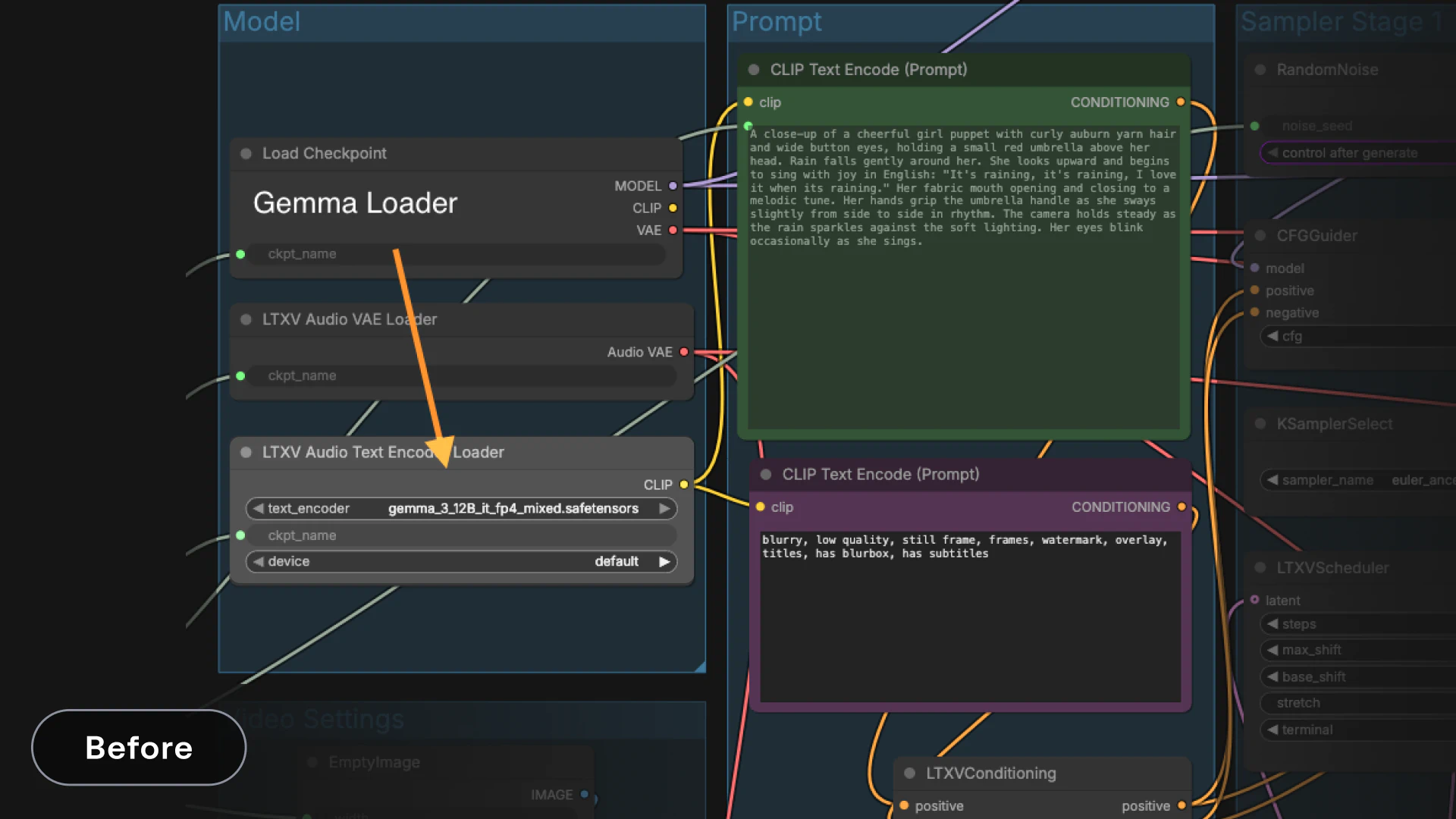
We saw a recurring pain point around Gemma, the model we use for text encoding. While it delivers high-quality encodings, its large memory footprint means it often needs to be unloaded and reloaded from VRAM. On consumer hardware, that makes prompt iteration unnecessarily slow, especially when prompts change frequently.
To address this, we’re introducing new nodes in the LTXVideo ComfyUI suite that remove Gemma from the critical path.
New nodes:
LTXVSaveConditioning / LTXVLoadConditioningSave and load prompt encodings without reloading Gemma. This is especially useful for workflows that reuse a small set of prompts, like Detailer flows where the effective prompt is often empty or static.
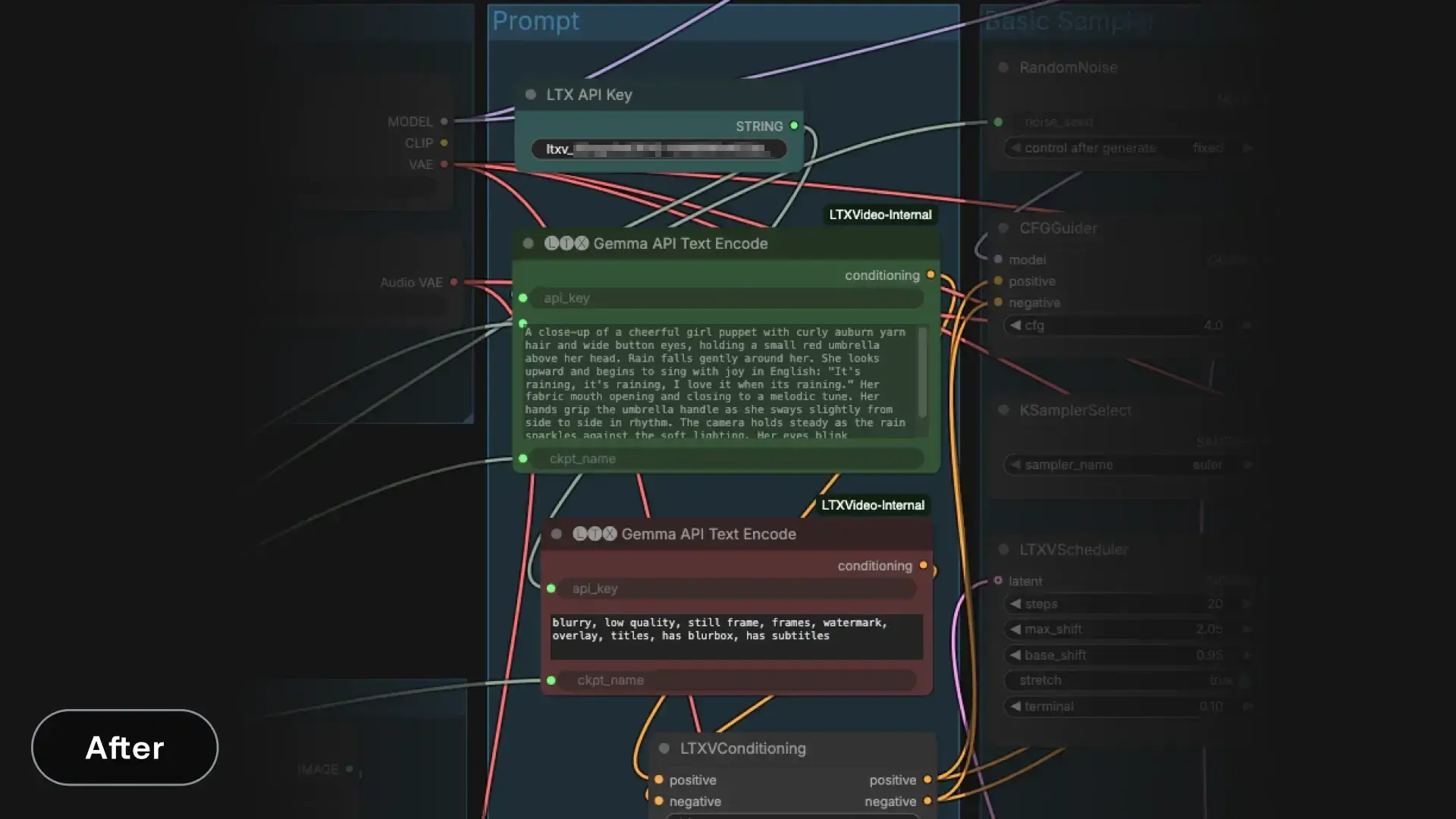
Gemma API Text Encoding (LTX)
A new node that performs Gemma encoding through our API. This endpoint is completely free and exists specifically to help the community run LTX locally.
Encoding typically completes in under a second and avoids loading Gemma into local VRAM altogether, even when prompts change. For many workflows, this removes the single biggest bottleneck in prompt iteration.
Note: this node handles text encoding only. Prompt enhancement, if desired, should happen before encoding.
In early testing, community members reported a noticeable shift in how usable prompt iteration felt. By removing the need to repeatedly load Gemma into VRAM, changing prompts stopped being a costly operation and became part of the normal workflow. The result was faster iteration loops, more prompt experimentation, and less pressure to “get it right” on the first try, especially on consumer GPUs.
How to use it:
- Obtain an API key from our console
- Configure the node with:
- api_key: your LTX API key
- prompt: the text you want to encode
- ckpt_name: the LTX checkpoint used for encoding (for example, ltx-2-19b-dev-fp8.safetensors). This should match the model used later in the pipeline
- Today we’re shipping the End-of-January LTX-2 drop, a set of updates focused on what builders have been asking for most: more control in real-world workflows. This work is built in the open and shaped by ongoing community feedback.
- Use the output like any other text encoding node. It produces embeddings that connect directly to downstream nodes
Multimodal Guider: independent control of prompt vs cross-modal alignment
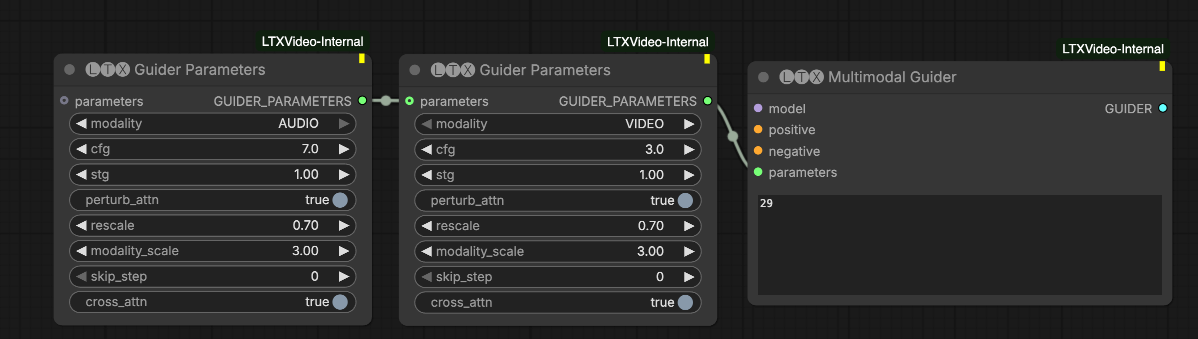
The Multimodal Guider, an extension of Classifier-Free Guidance (CFG), gives you fine-grained control over how tightly audio and video are coupled.
To understand why this matters, it helps to look at standard CFG in text-to-video models. Typically, the model generates two predictions: one conditioned on your prompt and one on a negative prompt. The difference between them represents the “direction” of your intent, which is then amplified to enforce prompt adherence.
With the Multimodal Guider, we generalize this idea across modalities and guidance strategies. Under the hood, the system can make up to four model calls to construct guidance that pushes the model away from multiple undesirable directions.
We expose three independent guidance dials, each configurable per modality:
CFG guidance (cfg > 1)
Pushes the model toward the positive prompt and away from the negative prompt. This controls prompt adherence and semantic accuracy. Each modality can have its own CFG scale.
Spatio-Temporal Guidance (stg > 0)
Pushes the model away from a perturbed, degraded version of itself to reduce artifacts, especially the breakup of rigid objects. This is based on the STG technique described here. Each modality can be tuned independently.
Cross-modal guidance (modality_scale > 1)
Pushes the model away from versions where modalities ignore each other. This controls synchronization. Higher values enforce tighter alignment, which is useful for lip-sync or rhythmic motion. Lower values allow looser, more natural coupling.
By separating these controls, you can now tune prompt accuracy, visual stability, and cross-modal synchronization independently.
Practical tuning tips:
- Increase cfg when visual style or object fidelity matters most
- Increase stg if you see structural artifacts or object breakup
- Adjust modality_scale to balance synchronization versus natural motion
Additional parameters:
- skip_blocks: attention layers to disable in the perturbed model used for STG. Use layer 29 unless you are intentionally experimenting
- skip_step: periodically skips diffusion steps for a modality
- 0: no skipping
- 1: skip every other step
- 2: skip two out of every three steps
- rescale: normalization after applying guidance
- 0: no normalization
- 1: full renormalization of the CFG-STG-MultiModal prediction to have the norm of the norm of the positive-prompt prediction
- values between 0 and 1: partial normalization
This is especially helpful for preventing oversaturation when using high CFG or STG values
- perturb_attn: this Boolean controls whether the perturbed model (the one we push way from during STG guidance) is perturbed for this modality or not. Normally set it to True.
- cross_attn: this Boolean controls whether the cross attention layers from this modality to the other modality is active or not. Normally set it to True.
Trainer improvements for IC-LoRA: faster iteration, better memory behavior
We shipped several trainer improvements aimed at making fine-tuning more practical on real hardware:
- Better memory behavior in common training workflows
- Faster iteration loops
- More predictable training on local or constrained GPUs
Inference is now roughly 2x faster, depending on video length and resolution.
How it works:
The reference video is first downscaled, usually by 2x, and used for video-to-video generation. This reduces the compute cost of cross-attention layers, leading to significant speedups. At inference time, the same approach is used, with RoPE aligned to the smaller grid.
IC-LoRA Union Control
As a followup to the trainer improvements, we trained a new IC-LoRA union control that works on a small grid while also supporting all three conditions: depth, pose, and edges - automatically choosing the right condition given the provided input. To use this new feature, update your Comfy to the latest version and use this Comfy workflow.
Try it, break it, give us your feedback
If you’re building on LTX-2, your feedback feeds directly into the roadmap. Test the new drop, share results, and flag what still feels brittle in Discord. The faster you surface sharp edges, the faster we can sand them down.


